The video loads from YouTube only when you press play.
What you get
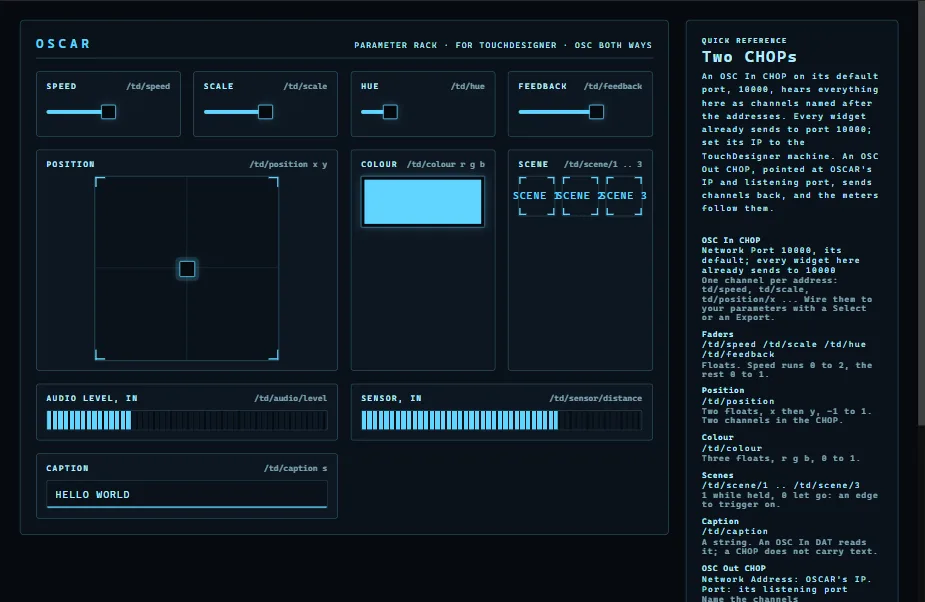
The TouchDesigner Parameter Rack is a template that ships with OSCAR: four faders, an XY pad, a colour picker, a caption you type, three scene keys and two meters that listen back. Every control already sends OSC to port 10000, TouchDesigner's default for an OSC In CHOP, so the whole rack reaches your network through two operators.
You will need
- TouchDesigner, 2022.35320 or newer (the sketches below are written for that build).
- OSCAR, on the TouchDesigner computer or on any other on the same network.
- A phone or tablet on that network.
Set up TouchDesigner: two CHOPs
- Add an OSC In CHOP. Leave Network Port at 10000. Everything the rack sends arrives as channels named after the addresses:
td/speed,td/scale,td/position/x,td/position/y,td/colour/rand so on. - Wire those channels to your parameters with a Select CHOP or an Export, as you would any CHOP.
- To send something back, add an OSC Out CHOP: Network Address is OSCAR's IP, Port is 8880, OSCAR's listening port. Name the channels
td/audio/levelandtd/sensor/distance(0 to 1) and the rack's two meters follow them, on every phone.
OSCAR_IP at the top, and run it.Set up OSCAR
- Open OSCAR and choose File → Open project or template → TouchDesigner Parameter Rack.
- If TouchDesigner is on another computer, select every control and set its Ip to that computer's address; on the same computer,
localhostis already right. - Press Publish, then Publish in the window that opens, and scan the QR code with the phone. Move a fader: the channel moves in the OSC In CHOP.
Two sketches to download
Each one uses every control on the rack. Drop the .tox into your network (or File → Import Component); it brings its own OSC In CHOP on port 10000, so the rack drives it as soon as both are on the same network. The .py is the sketch's source: paste it into a Text DAT and run it to build the same thing from scratch, or to read how it is done.
Type Tunnel
The caption you type on your phone flies through a tunnel of its own trails, tiles into a drifting wall, or orbits the point you hold on the pad. Scenes 1 to 3 switch between tunnel, wall and orbit.
Kaleido Feedback
A kaleidoscope of flowing noise centred where you hold the pad, with the caption folded into the mirrors and written plainly in the middle. Scenes 1 to 3 give 3, 6 or 12 mirrors.
Every address on the rack
| Control | Address | What arrives |
|---|---|---|
| Speed, Scale, Hue, Feedback | /td/speed /td/scale /td/hue /td/feedback | One float each. Speed runs 0 to 2, the rest 0 to 1. |
| XY pad | /td/position | Two floats, x then y, −1 to 1: two channels in the CHOP. |
| Colour | /td/colour | Three floats, r g b, 0 to 1. |
| Caption | /td/caption | The text, as typed. |
| Scenes | /td/scene/1 to /td/scene/3 | 1 when pressed; the last one pressed stays. |
| Meters (in) | /td/audio/level /td/sensor/distance | Send 0 to 1 to OSCAR on port 8880 and the meters follow. |
From the phone, and from anywhere
On your own network nothing more is needed: every phone that scans the code gets the rack, and they all show the same state. For a visitor on mobile data, OSCAR Pro gives the interface a public link that works from anywhere, with no access to your Wi-Fi.
When nothing moves
Click ACTIVITY in OSCAR's top bar: the network log shows every message sent, to which address and port. If OSCAR sends and TouchDesigner stays still, check the OSC In CHOP's port and that a firewall on the TouchDesigner computer lets UDP 10000 through.
More guides
Resolume Arena · QLab · DMX lights · MIDI and DAWs · Getting started