What you get
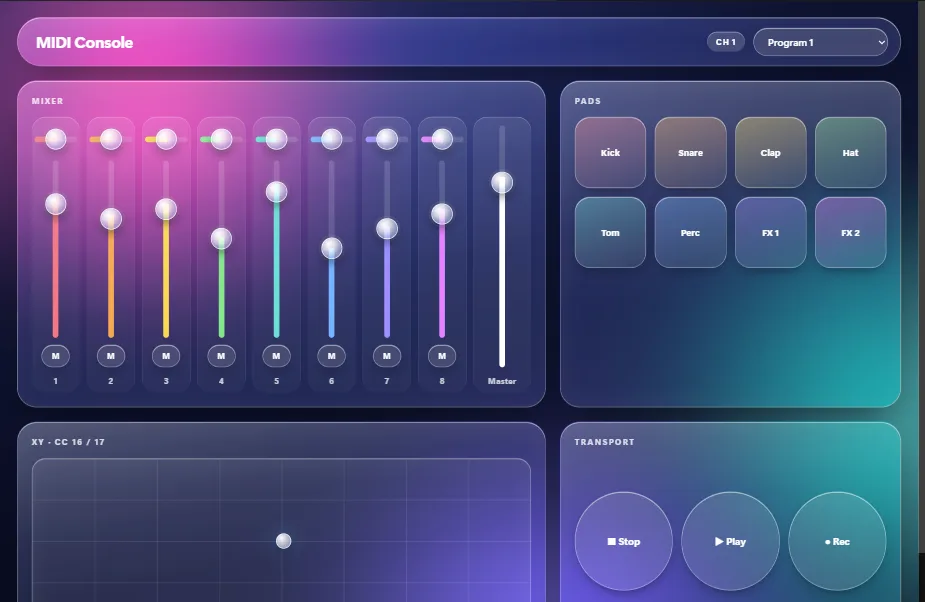
The MIDI Console, Liquid Glass template is an eight-channel controller: eight strips of pan, fader and mute, a master, eight pads, an XY pad, transport keys and a program picker. Every control sends MIDI on channel 1 to the first MIDI output the OSCAR computer has, with OSC off. The numbers are the ones hardware controllers use, so MIDI Learn in Ableton, Bitwig, Logic, Reaper or TouchDesigner picks each control up at the first touch.
You will need
- Software that takes MIDI: a DAW, a synth, TouchDesigner, Resolume.
- OSCAR. The MIDI ports belong to the computer running it, so for software on the same computer you need a virtual MIDI port (below). For a hardware synth, OSCAR's computer needs a MIDI interface.
- A phone or tablet on the same network.
A virtual MIDI port
- macOS: open Audio MIDI Setup, show the MIDI Studio, double-click IAC Driver and tick Device is online. The IAC bus is now a port.
- Windows: install loopMIDI and add a port. OSCAR lists it.
- Linux:
snd-virmidi, or a JACK or ALSA bridge.
Set up OSCAR
- File → Open project or template → MIDI Console, Liquid Glass.
- Select every control and, in the MIDI section, set Out port to the virtual port (or to your interface). As it comes, it sends to the first output the computer has.
- In your DAW, choose that port as a control-surface or track input, start MIDI Learn, and touch a control on the canvas, or on the phone once it is published.
- Press Publish, then Publish in the window, and scan the QR code.
What the console sends
| Control | Sends |
|---|---|
| Faders 1 to 8 | CC 21 to 28, 0 to 127 |
| Pans 1 to 8 | CC 31 to 38 |
| Mutes 1 to 8 | CC 41 to 48, 127 on and 0 off |
| Pads | Notes 36 to 43, note on at full velocity, note off when let go |
| XY pad | CC 16 for X and CC 17 for Y |
| Program picker | Program change |
All on channel 1; change the channel, type and number per control in its MIDI section. A slider sends its position scaled to 0 to 127 whatever its range; a control with several values uses the numbers that follow, so a pad on CC 20 sends X on 20 and Y on 21. Pitch bend uses all 14 bits. System exclusive and clock are not sent.
The other way: a knob that moves the phone
Tick Data in in a control's MIDI section and a knob, fader or pad on a hardware controller moves it, on every phone and on the editor's canvas. Learn fills in channel, type and number from the next control you touch. A control can pass on what it receives (Send when), so one knob on a MIDI controller can dim a light over DMX and move a video over OSC at once.
When nothing arrives
Click ACTIVITY in OSCAR's top bar for the network log: every MIDI message, with its port, channel and number. If messages go out and the DAW hears nothing, the DAW is listening to a different port, or the virtual port is not online. An interface that is unplugged is looked for again every two seconds and picked up when it returns.
More guides
TouchDesigner · Resolume Arena · QLab · DMX lights · Getting started