
What you get
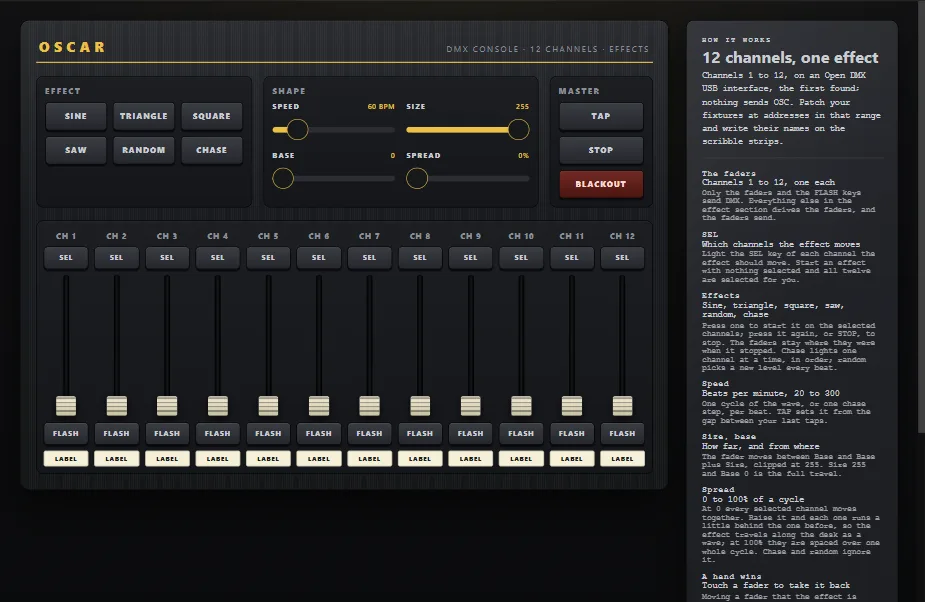
The DMX Console, 12 Channels template is a generic desk: twelve channel strips, each a fader, a SEL key, a FLASH key and a scribble strip, for whatever sits on DMX channels 1 to 12. Above them an effect engine: six waves (sine, triangle, square, saw, random, chase) that move the selected faders, with Speed, Size, Base and Spread, a TAP key for the tempo, STOP and BLACKOUT. The faders and the FLASH keys are the only controls on the wire; the effects move them as a hand would, so every device sees the chase.
You will need
- Fixtures on DMX, and one of: an Art-Net or sACN node on the network, an Enttec DMX USB Pro (or a DMXKing, or any of the many Pro-protocol interfaces), or an Enttec Open DMX USB or clone.
- OSCAR on a computer: on the network with the node, or with the USB interface plugged into it. A Raspberry Pi in the rack does fine.
- A phone or tablet on the same network as OSCAR.
Set up OSCAR
- File → Open project or template → DMX Console, 12 Channels. As it comes, the faders drive the first Open DMX interface found on USB, universe 1, channels 1 to 12.
- For anything else, select the twelve faders and the twelve FLASH keys together and open the DMX section of the settings:
- Protocol: Art-Net, sACN, Enttec Pro or Open DMX.
- Node (network): the node's address, or blank to reach every node: a broadcast on Art-Net, a multicast on sACN. Interface (USB): the serial port, or the first interface found.
- Universe: 0 to 32767 on Art-Net (the 15-bit port-address), 1 to 63999 on sACN, 1 on USB.
- Channel and Channels: the first channel of the control's block and how many from there; a fader is one, a colour picker three (red, green, blue), an XY pad two (pan, tilt).
- Press Publish, then Publish in the window, and scan the QR code. Push a fader up: the fixture follows.
What a control sends
- A slider sends its level as 0 to 255 across its own range: a fader labelled 0 to 100 is still full at the top.
- A button sends full while held and zero when let go, a FLASH key.
- A colour picker sends red, green and blue on three channels in a row; an XY pad sends pan and tilt on two.
- Several controls on one universe are merged into one frame, and OSCAR keeps every universe it drives on the air (nodes and sACN receivers drop a source that goes quiet), so a fixture never goes dark because a phone went to sleep.
USB, two kinds
An Enttec Pro, a DMXKing or a Pro-protocol clone makes the DMX signal itself, so it is as dependable as a node: OSCAR hands it a frame and it repeats it. An Open DMX interface is a bare serial chip, and the computer makes the signal, forty frames a second; that works, and a very busy computer can show it as a flicker. The port is opened at the first frame and held, and an interface that is not there yet is looked for every two seconds, so plugging it in later is enough.
When the rig stays dark
Click ACTIVITY in OSCAR's top bar: the network log shows every frame, with its protocol, universe and channels. Check the universe numbering (Art-Net counts from 0, sACN from 1), the node's address, and that the fixture's DMX address matches the channel.
More guides
TouchDesigner · Resolume Arena · QLab · MIDI and DAWs · Getting started