
What you get
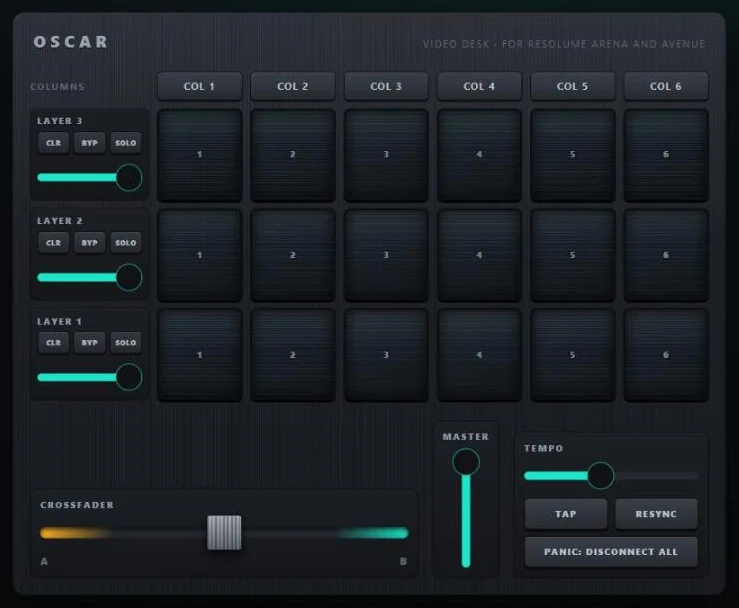
The Resolume Video Desk template is a desk for Arena and Avenue: three layers of six clip keys, a row of column keys, and for each layer its opacity fader, SOLO, BYPASS and CLEAR. Under them the crossfader, the master fader, tempo tap, BPM and resync, and a disconnect-all. Every control already sends to port 7000, Resolume's default; you set the IP once.
You will need
- Resolume Arena or Avenue, on a computer.
- OSCAR, on that computer or on any other on the same network.
- A phone or tablet on that network.
Set up Resolume
- Arena → Preferences → OSC. Turn OSC Input on; the port is 7000.
- For the faders to follow what happens in Resolume, turn OSC Output on as well, with OSCAR's IP as the address and 8880 as the port, OSCAR's listening port. A layer's opacity moved in Resolume then moves on every phone.
- Put clips in layers 1 to 3, columns 1 to 6.
Set up OSCAR
- File → Open project or template → Resolume Video Desk.
- If Resolume is on another computer, select every control and set its Ip to that computer's address. On the same computer,
localhostis already set. - Press Publish, then Publish in the window, and scan the QR code. Hold a clip key: the clip plays while the key is held.
The addresses
| Control | Address | Notes |
|---|---|---|
| Clip | /composition/layers/L/clips/C/connect | 1 while held. L is the layer, C the column. |
| Column | /composition/columns/C/connect | 1 while held: every clip in the column starts. |
| Opacity | /composition/layers/L/video/opacity | 0 to 1. Follows Resolume with OSC Output on. |
| Solo, bypass, clear | /composition/layers/L/solo /composition/layers/L/bypassed /composition/layers/L/clear | |
| Crossfader, master | /composition/crossfader/phase /composition/master | 0 to 1. |
| Tempo | /composition/tempocontroller/tempotap /composition/tempocontroller/tempo /composition/tempocontroller/resync | |
| Disconnect all | /composition/disconnectall |
Resolume's full list is in its own manual under OSC; any of them goes into a control's Message field.
From the phone, and from anywhere
Every phone that scans the code shows the same desk, and they stay in step. For a visitor on mobile data, OSCAR Pro gives the interface a public link that works from anywhere, with no access to your Wi-Fi.
When nothing moves
Click ACTIVITY in OSCAR's top bar for the network log: every message, with its address and port. If messages go out and Resolume stays still, check OSC Input is on and the port is 7000, and that a firewall on the Resolume computer lets UDP 7000 through.
More guides
TouchDesigner · QLab · DMX lights · MIDI and DAWs · Getting started